2026. 7. 25. 06:25ㆍ카테고리 없음
Type "jobs in LinkedIn" into a search bar and you'll land on two different questions. One person means working at LinkedIn the company. Almost everyone else means something else entirely: how do I use this platform to actually get hired, get noticed, get ahead. This guide is about that second question.
Quick answer: Building a career on LinkedIn in 2026 means combining an AI-readable profile with real, demonstrable skills, LinkedIn's newer AI job-search tools, and consistent visibility through posts and comments — not just a finished profile and a pile of applications.
Table of Contents
- What Changed on LinkedIn in 2026
- Build a Profile That Works for Humans and AI
- Use LinkedIn's AI Tools Without Losing the Human Touch
- The Skills That Actually Move the Needle
- Visibility Beats Just Applying
- Free vs. Premium: What's Worth Paying For
- Mistakes That Quietly Hurt Your Chances
- A Simple Weekly Routine
- FAQ
What Changed on LinkedIn in 2026
A few years ago, a solid LinkedIn strategy was simple: decent photo, complete profile, apply to as many postings as possible. That still matters. It's just not enough anymore.
Two features reshaped job searching on the platform this year. AI Job Search lets you describe the role you want in plain language instead of clicking through filters, and LinkedIn responds with matches plus specific suggestions for strengthening your profile around them. Job Tracker gives you one dashboard for every application, interview stage, and follow-up, replacing the spreadsheet most job seekers used to keep on the side.
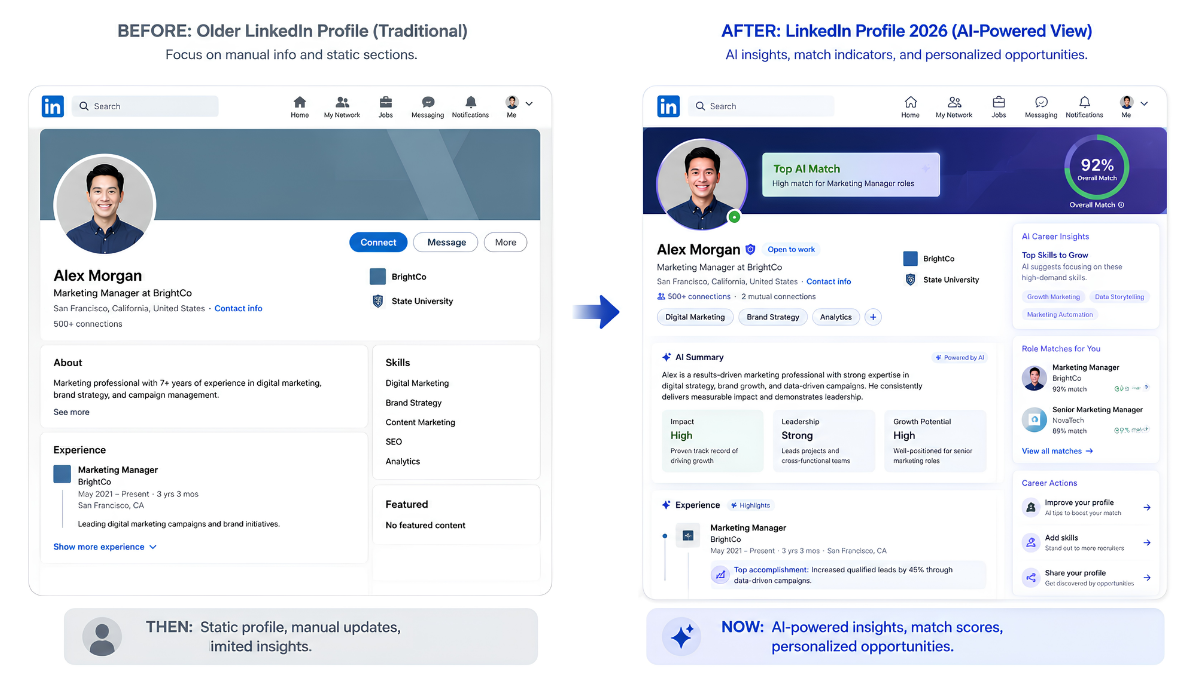
Recruiters got new tools too. Many now lean on AI-assisted screening that scans a profile's headline, About section, listed skills, and recent activity to judge fit — often before a person ever opens the tab. That's the part people miss. Your profile isn't read by a human first anymore. Software gets the first pass.
Build a Profile That Works for Humans and AI
Here's the shift: your profile now has two audiences, and they read it differently.
A person skims your photo, headline, and the first couple of lines of your About section in a few seconds. Software parses the whole profile for keywords, skill tags, and how recently you've been active. Write for both.
Your headline should say what you do and for whom, not just repeat your job title. "Marketing Manager" tells a screening tool almost nothing useful. "B2B SaaS Marketing Manager — Demand Gen & Lifecycle Campaigns" tells a person and an algorithm exactly where you fit.
A few habits worth building into your profile:
- Write your About section like you're explaining your work to a smart stranger, not repeating a resume.
- List skills you can back up with a real example, not everything you've ever brushed against.
- Set "Open to Work" to recruiters-only if you're currently employed and don't want your manager to notice.
- Use a custom profile URL. Small detail, but it signals you've paid attention.
None of this needs to be perfect on day one. It needs to be specific, true, and current.
Use LinkedIn's AI Tools Without Losing the Human Touch
The AI Job Search tool is truly useful — and easy to lean on too hard.
Describe the role you want ("remote project manager, healthcare, five years experience") and LinkedIn surfaces matches along with profile tweaks that might help you rank higher for similar roles. Pair that with AI Career Coach inside LinkedIn Learning, which sketches a learning path based on where you say you're headed.
Here's the catch nobody puts in the marketing copy: a tool that makes applying faster doesn't make you a stronger candidate. It just removes friction. Generic, un-tailored applications get filtered out quickly in today's hiring environment, so speed without customization tends to backfire. Use the AI tools to find the right ten roles, then spend real time tailoring your pitch for each one. Job Tracker is what keeps that process organized instead of scattered across browser tabs.
The Skills That Actually Move the Needle
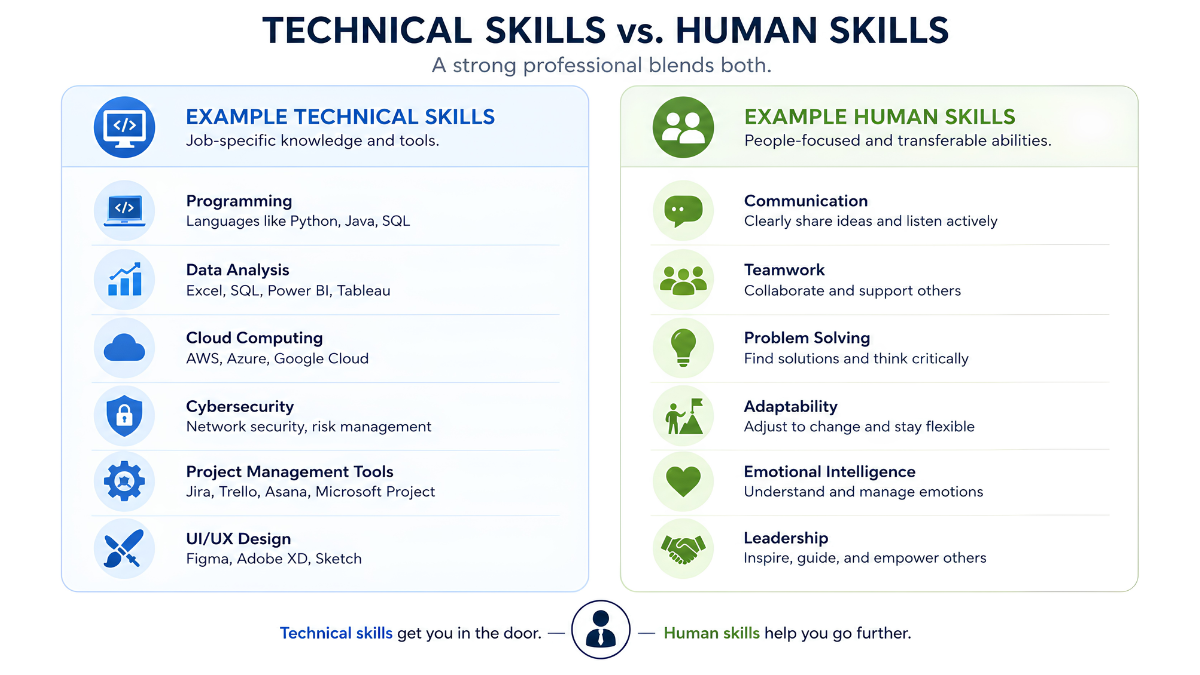
LinkedIn's own 2026 skills research, drawn from its member base, turned up something that surprises a lot of job seekers: the fastest-growing skills stretching from AI literacy at the top of the technical list to human skills like conflict resolution and public speaking rounding out most of the top ten.
That lines up with what employers are telling researchers directly. The World Economic Forum's Future of Jobs Report 2025 projects that a large share of core job-market skills will be transformed by the end of the decade, and a recent NACE employer survey found a growing majority of employers now use skills-based hiring — evaluating what you can actually do over where you studied.
The practical takeaway: don't chase either track alone. Pair one technical skill (AI tool fluency, data analysis, whatever fits your field) with one human skill you can demonstrate, like negotiation or leading a hard conversation. People who do this stand out precisely because most candidates still pick one lane.
Visibility Beats Just Applying
Picture two people with nearly identical resumes. One applies quietly to forty jobs. The other applies to fifteen, comments thoughtfully on a handful of posts in their industry each week, and shares a short, specific take on their work once in a while.
The second person tends to get more replies. Not because LinkedIn rewards noise — generic, engagement-bait posts fade fast in 2026's feed — but because consistent, specific activity builds an authority signal that both recruiters and LinkedIn's own ranking system notice.
You don't need to become a content creator to benefit from this. Commenting well on three posts a week does more than most people expect.
Key takeaways
- Your profile has two audiences now — people and screening software — so write for both.
- AI Job Search and Job Tracker speed things up; they don't replace tailoring each application.
- Pair one technical skill with one human skill instead of leaning on either alone.
- Small, consistent activity builds visibility that outlasts any single job application.
Free vs. Premium: What's Worth Paying For
| AI job matching & profile tips | Basic | Full recommendations |
| Job Tracker | Included | Included |
| InMail credits | None | Monthly allotment |
| Who's viewed your profile | Limited view | Full list |
| LinkedIn Learning courses | Limited previews | Full library |
| Salary insights | Limited | Detailed |
If you're actively interviewing, a one-month Premium trial timed around that search is a reasonable spend. If you're maintaining a presence between searches, the free tier covers nearly everything that actually matters.
Mistakes That Quietly Hurt Your Chances
- Mass Easy Apply with zero customization. Feels productive. Rarely converts.
- An outdated or missing profile photo. It's the first filter most people apply without realizing it.
- A generic skills section. Five vague skills lose to three specific, provable ones.
- Going quiet for months, then wondering why there are no surfaces. Activity is part of how you get found now, not a bonus.
- Setting “Open to Work” once and forgetting it. Update it as your situation changes.
A Simple Weekly Routine
- 15 minutes: update one part of your profile — a skill, a project, a recent win.
- 10 minutes: comment on three posts from people in your target field.
- 20 minutes: research and tailor one application, tracked in Job Tracker.
- 5 minutes: check your "Open to Work" setting if anything changed.
Under an hour a week. It compounds faster than most people expect.
FAQ
Is LinkedIn Premium worth it for job searching? It depends on how actively you're searching. Premium adds InMail credits, full profile-viewer visibility, and deeper salary data, which helps during an active search. If you're between searches or just maintaining a presence, the free tier covers most of what matters for building a career on LinkedIn.
What is LinkedIn AI Job Search and how does it work? It lets you describe the role you want in plain language instead of clicking through filters. LinkedIn surfaces matching postings and suggests specific profile changes that could improve your visibility for similar roles.
Should my "Open to Work" banner be public or recruiters only? If you're currently employed, recruiters-only keeps your search private from your employer while still signaling availability to recruiters. Public visibility makes more sense if you're unemployed and want maximum reach.
How often should I post on LinkedIn to build a career there? Consistency matters more than frequency. A short post or a few thoughtful comments once or twice a week, sustained over months, builds more authority than a burst of activity followed by silence.
Does LinkedIn's algorithm favor certain content in 2026? It favors content that signals real expertise and sparks genuine conversation, not just likes. Generic motivational posts tend to fade quickly, while specific, experience-based posts hold visibility longer.
What is LinkedIn Job Tracker? It's a built-in dashboard for organizing your job search — applications, interview stages, and follow-ups — in one place instead of a separate spreadsheet or app.
How many skills should I list on my LinkedIn profile? Fewer, well-supported skills beat a long generic list. Choose ones you can back up with an example in your experience section, and keep the list current as your role evolves.
Can I build a career on LinkedIn without paying for Premium? Yes. A complete, keyword-clear profile, regular activity, and thoughtful networking do most of the work. Premium speeds up certain tasks but isn't required to get results.
What is the LinkedIn AI Career Coach? It's a feature inside LinkedIn Learning that suggests learning paths and points out skill gaps based on the career direction you tell it you're aiming for.
How long should my LinkedIn About section be? Long enough to explain what you do, who you help, and how, in plain language — usually a few short paragraphs. Save the resume-style bullet list for your experience section instead.
Is Easy Apply a good strategy in 2026? It works for volume applications to roles you're solidly qualified for, but generic, un-tailored Easy Apply submissions tend to have a low success rate in today's AI-filtered hiring environment. Use it selectively, not as your entire strategy.
What's the difference between a "job at LinkedIn" and a "career built through LinkedIn"? A job at LinkedIn means working for the company itself, listed on its careers page. A career built through LinkedIn means using the platform's profile, networking, and job-search tools to find and grow a career anywhere.
How do recruiters find candidates on LinkedIn in 2026? Increasingly through AI-assisted search and screening that scans profiles for keyword match, skills alignment, and activity signals, alongside traditional keyword search and direct outreach.
What skills are most in demand on LinkedIn in 2026? AI literacy tops the technical list, while human skills like critical thinking, adaptability, and communication fill most of the rest of the top ten, according to LinkedIn's own 2026 skills research.
How do I know if my LinkedIn profile is actually working? Watch profile views, search appearances, and inbound messages over a few weeks after making changes. A rising trend in any of these means the changes are landing; Flat numbers mean it's worth revisiting your headline and keywords.
A career in LinkedIn in 2026 isn't built through one big profile overhaul. It's built through a profile that reads well to people and to screening software, a search strategy that uses AI tools without depending on them entirely, and small, consistent activity that keeps you visible between job searches instead of only during them.
Start with one thing this week: rewrite your headline, comment on three posts, or set up Job Tracker for the applications you already have open. Small, repeated actions beat a perfect profile you never touch again.